
The General Settings Sections of the intranet controls the use of different features and sets default system values.* The image below will act as a guide to this article.
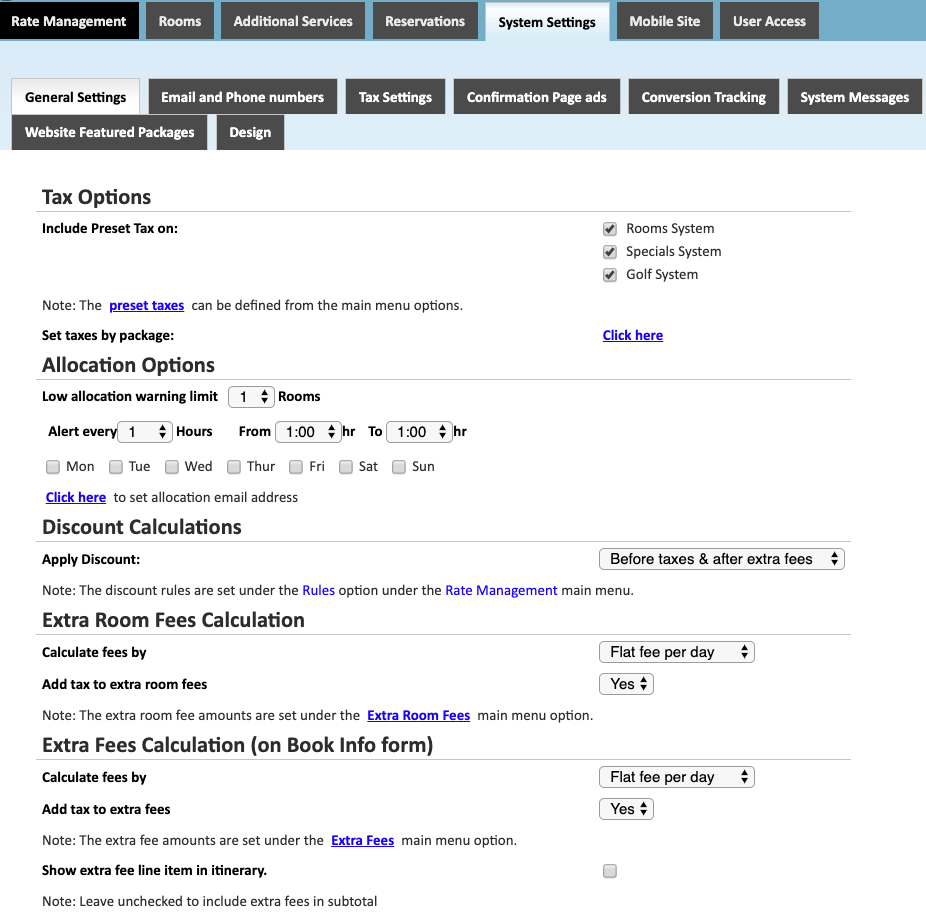
Tax Options
Include Preset Tax on- Select which package types to apply the preset tax for. You can control if taxes will be applied to packages selling Rooms, Specials, and/or Golf. You can decide to apply taxes to any combination of the three.
Allocation Options
Low Allocation Warning Limit- If the inventory of a room type falls below this level, a notification will be sent out.
Alert Time Settings- Controls the time between alerts and the time of day that the alert will be sent. This allows you to limit alerts during business hours.
Days of Week- Controls which days of the week alerts will be sent.
Set allocation email address- set an email for the alert to go to.
Discount Calculations
Controls how the discounts configured in the Rules section of the intranet will be applied to a reservation. The two options are to apply the discount Before Taxes & After Extra Fees or Before Taxes & Before Extra Fees. This allows for discounts to only be applied to the accommodations and/or tee time charges of the reservation.
Extra Room Fees Calculation
These settings control how the fees in the Extra Room Fees section of the intranet will be calculated on the reservation.
Calculate fees by- controls if the Extra Room Fee is calculated as a Flat Fee, Flat Fee Per Day, or Flat Fee Per Person.
Add tax to extra room fees- Controls whether or not the tax settings will be applied to the extra fees.
Extra Fees Calculation
These settings control how the fees in the Extra Fees section of the intranet will be calculated on the reservation.
Calculate fees by- controls if the Extra Room Fee is calculated as a Flat Fee, Flat Fee Per Day, or Flat Fee Per Person.
Add tax to extra room fees- Controls whether or not the tax settings will be applied to the extra fees.
Show extra fee line item in itinerary- Controls if the Extra Fee will be displayed as a separate line item on the reservation itinerary.
*Based on the configuration of your system some of the above options may not be available. If you would like information about adding a service please call our support center at 843.839.1456
Continue Reading about the other parts of the System Settings:
General Settings -Part 1 (Live Interface)
General Settings -Part 2 (Live Interface)
General Settings - Allocation Rate Settings
Email and Phone Numbers
Confirmation Page Ads
Stay Alert Messages
Tax Settings
Website Information
Comments
0 comments
Please sign in to leave a comment.