
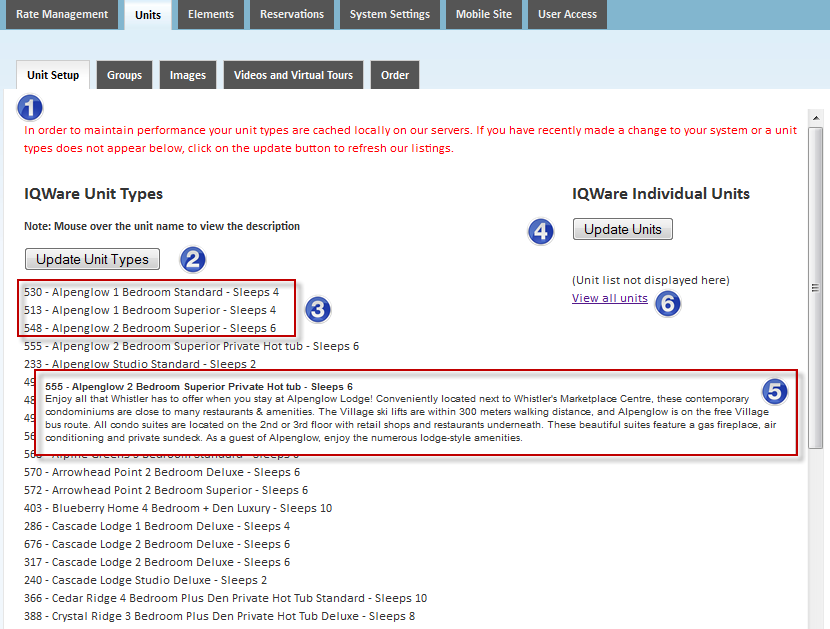
The Unit Setup tab is used to update room information that has been published in the PMS. The page is simple to use and only contains one button. The following image will act as a guide to this page.*
Points of Reference: 1 | 2 | 3 | 4 | 5 | 6 | 7 |
-
Red Note
Explains that the list of rooms below is cached and that any changes in the PMS will be updated only after clicking on the update room types button.
-
Update Unit Types
Use this button to update the unit types published in the PMS. This procedure contacts the PMS and grabs published information about the unit types. Information includes attributes, descriptions, and unit type names.
-
IQware Unit Types
List of all unit types published in the PMS. The number at the beginning of each line is the IQware room type ID.
-
Update Individual Units
Use this button to update the individual unit types published in the PMS. This procedure contacts the PMS and grabs published information about the unit types. Information includes attributes, descriptions, and unit type names.
-
Popup Info Screen
When the cursor hovers over a unit type a popup window will appear with a detailed description of the room
-
View all Units
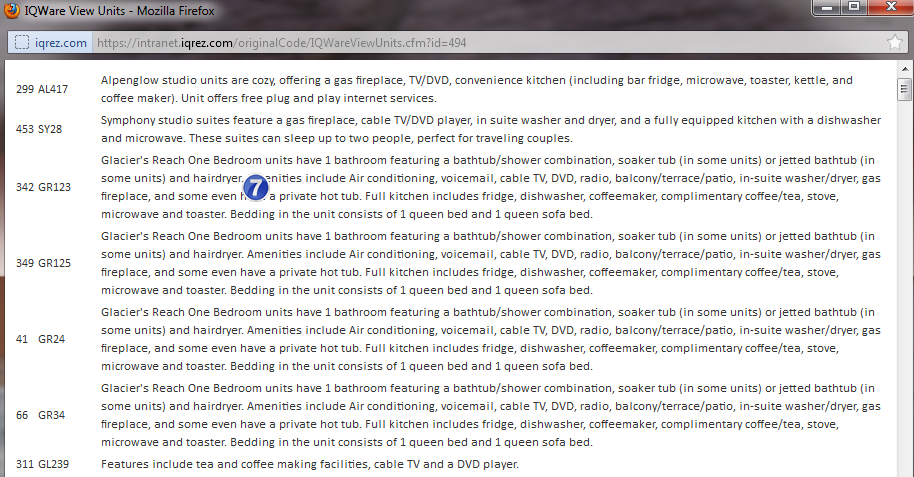
Use this link to view all units in a popup window. It includes a detailed summary of each room offered.
-
Popup Window View all Units
An example of the popup window under the view all units link.
*Based on the configuration of your system some of the above options may not be available. If you would like information about adding a service please call our support center at 843.839.1456
Continue reading about the other sections of the Rooms menu:
Room Setup - Allocation
Room Setup - Guestmate
Unit Setup - IQware
Images
Virtual Tour
Groups
Inventory
Restrictions
Comments
0 comments
Please sign in to leave a comment.